Note: This article was last updated July 2026.
Key Takeaways
- Investing in a customer portal solution can help improve retention rates and increase profits. Customers should be able to use the portal to access key information, update information, and contact support reps.
- Implementing a customer self-service portal frees up in-house teams to focus on more complex issues.
- Customer portals are beneficial for all industries. See this blog for 8 examples across different verticals.
Whether you’re a B2B, B2C, or B2B2C company, improving customer experiences should be at the top of your list when exploring digital solutions. Investing in quality customer service technology, like customer portal software, can improve retention rates and increase profit. However, in order to see the benefits a customer portal can offer, your portal needs to be user-friendly, intuitive, and efficient for your users and support team.
What Is a Customer Portal?
A customer portal or client portal is a secure, online platform that acts as a centralized hub for customers to manage their relationship with a company. Customers can use it to access information and how-to-videos, update their account information, contact live chat support or a support rep, or even submit support tickets to resolve issues.
Self-service customer portals are not only helpful to equip your customers, but can also help your support team be more efficient. Customer self service portals often include other self service options, such as knowledge bases and community forums, to give users multiple ways to solve problems independently. Implementing a customer self-service portal frees up in-house teams to focus on more complex issues. This allows human resources to focus on more strategic business processes, improving overall organizational efficiency. Using the right portal software to implement your customer service strategy will help lower costs and create better customer experiences. Providing step by step instructions, popular articles, and product documentation within the portal helps customers solve problems quickly and efficiently.
Benefits of Customer Portals
A customer portal can help businesses deliver better customer experiences while making service operations more efficient. When customers have a secure, easy-to-use place to find information, manage account details, and request help, they can solve many routine issues on their own.
For support teams, this means fewer repetitive requests and more time to focus on complex customer needs. For customers, it means faster access to the answers, services, and resources they need.
Faster access to information
Customers don’t want to wait for a support representative every time they need a document, answer, or status update. A customer portal gives them direct access to resources such as FAQs, knowledge base articles, product documentation, how-to videos, billing information, and service updates.
This helps customers find answers quickly and complete simple tasks without needing to contact the support team.
Fewer repetitive support requests
Many support requests involve routine questions or tasks, such as checking order status, updating account information, downloading documents, or finding troubleshooting steps.
By making these options available through a self-service customer portal, businesses can reduce incoming support tickets and free up internal teams to focus on higher-value work.
A more consistent customer experience
When customer information is spread across disconnected systems, emails, and service channels, it can be harder to deliver a consistent experience.
A customer portal gives businesses a centralized place to provide approved resources, account-specific information, service processes, and support options. This helps customers get more reliable information, no matter when or how they access the portal.
Easier account and service management
A customer web portal can bring multiple tools and resources into one secure online experience. Depending on the business, customers may be able to view account details, track orders, manage billing information, submit support tickets, access product resources, or communicate with service teams.
Instead of switching between different systems or waiting for manual support, customers can manage more of their relationship with the business in one place.
More personalized customer journeys
Customer portals can also help businesses provide more relevant experiences. With the right portal solution, customers can see information based on their account, role, products, services, location, or service history.
For example, one customer may see product documentation and warranty information, while another may see billing tools, order history, or open support cases. This makes the portal more useful and helps customers get to the right information faster.
Better insight into customer needs
Customer portals can help businesses understand what customers are searching for, which resources they use most often, and where they may need more help.
These insights can help teams improve knowledge base content, identify common service issues, refine customer journeys, and continue improving the portal over time.
Key Features of Customer Portals
A self service customer portal is a powerful tool for businesses aiming to boost customer satisfaction and streamline support operations. The most effective customer portals are designed with both the customer and the support team in mind, offering a suite of features that empower users to self serve while reducing the workload on support teams. A few of these key features include:
-
Strong authentication and security features to ensure that only customers with authorized access are able to log into the portal and to see information that is tied only to their accounts.
-
Robust knowledge base. By providing customers with easy access to searchable knowledge base articles, FAQs, and how to videos, businesses enable users to find instant answers to common questions without needing to contact support. This not only improves the customer experience by offering immediate solutions, but also helps lower support costs by reducing incoming support requests and phone calls to the support line.
-
A unified, tailored dashboard, giving customers a single place to view account information, billing history, order status, and support tickets. With the ability to track progress on their own issues, customers feel more in control and are less likely to require direct support for routine inquiries. Personalized dashboards and a prominent search bar further enhance usability, making it simple for customers to find the support resources they need.
-
Community forums and file sharing capabilities, allowing customers to collaborate, share insights, and learn from other customers’ experiences. These features foster customer loyalty and create a sense of community, while also providing additional self service options beyond traditional support channels.
-
Live chat support and direct support options remain essential for more complex issues, ensuring that customers can quickly escalate problems when self service options are not enough. Robust platforms should be able to connect to any of the major live chat providers, including Zendesk, LiveChat, and others.
By giving customers the right tools to self serve, businesses can enhance the customer experience, build customer loyalty, and achieve greater operational efficiency. Whether you’re planning a new portal or upgrading an existing one, focusing on these features will help ensure your customer service portal delivers real value to both your customers and your business.
In this blog, we’ll draw insights from eight organizations across different industries that used Liferay Digital Experience Platform (DXP) to build successful customer portals.
Customer Self-Service Portal Examples
1. Airbus Helicopters
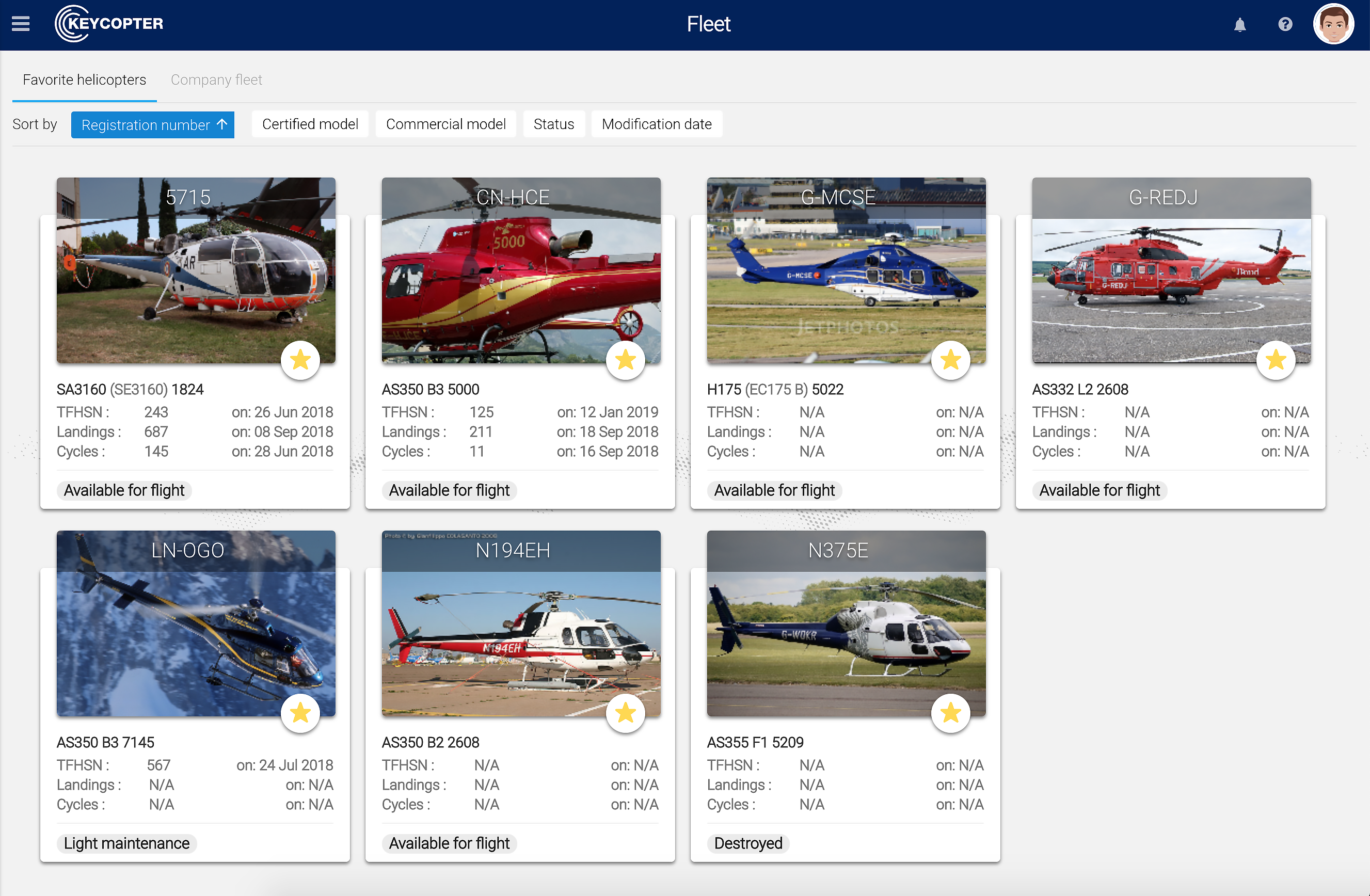
More than 3,000 civil and military operators rely on Airbus Helicopters’ customer portal to keep their aircraft operational. The company needed to redesign the portal in order to turn it into a modern customer engagement tool that could be accessed anytime through any device.
Airbus Group chose Liferay for its rich features and customizable elements. Keycopter, the new portal, was rolled out to over 24,000 users across 3,000 companies. In Keycopter, operators can view and download up-to-date technical documents, manage claims and warranties, purchase spare parts, track online invoices, view order history, and access billing information — all through a single platform. Modernizing this online service helped Airbus Group enhance the B2B customer experience and simplify its operations.
2. EATEL
EATEL is a family-owned and operated communications company in Louisiana, US. This organization needed a responsive self-service customer portal to support their residential and business customers. After using Liferay DXP to create a new website, EATEL also used Liferay to build their customer portal.
The launch of the new service portal reduced customer support tickets for agents, provided greater accessibility through responsive design, allowed customers to easily access and update their billing information, decreased billing issues, and improved overall customer satisfaction.
“The flexibility of Liferay has been key,” said the director of IS at EATEL. “So much of the portal is editable by non-developers, allowing us to focus our most technical internal resources on the intricacies of integrations and highly advanced content pages. This also enables us to be quick to market with offers and promotions that might have taken up to a month to reach users through other means.”
3. Broadcom
A global technology leader in semiconductor and infrastructure software solutions, Broadcom wanted to relieve the burdens on their support teams and serve customers with a better universal support hub.
With their new customer service portal, customers can access everything via their permissions-based dashboard. The dashboards and product pages provide customers with access to specific education, documentation, licensing, and software downloads. When support is required, customers can rely on Search to find knowledge base articles and tech docs, converse with other customers via communities and blogs, and easily reach customer support through virtual and live agents. Customers can even create and track cases right inside the self-service portal.
"Everything we wanted to do in terms of providing customer self-service has been realized," said Erica Callaghan, Communications and UX Officer for Broadcom.

Insurance Client Customer Portal Examples
4. Merkur Versicherung
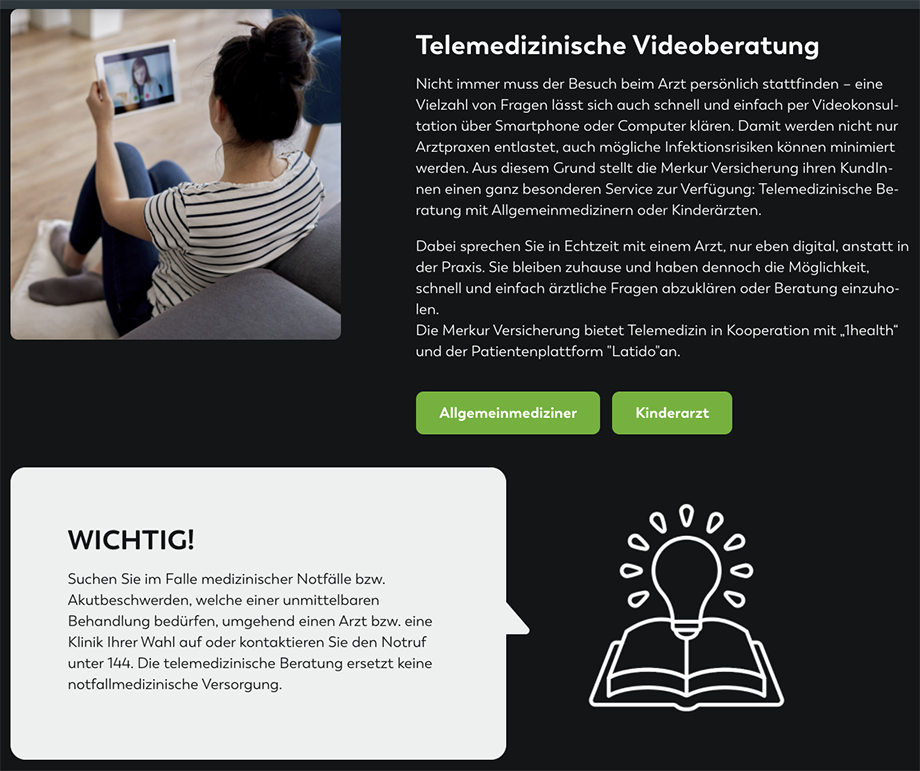
As Austria’s oldest insurance company, Merkur Versicherung wanted to find new ways to put their customers’ needs first. In order to do this, Merkur needed to provide customers, employees, external brokers, and partners with tools to create seamless customer experiences.
Liferay provided updated portals that helped equip customers with self-service tools to view contracts, submit bills, and sign up for prevention programs. The portal offers robust client collaboration features, such as secure file sharing and centralized communication, to enhance teamwork among customers, employees, brokers, and partners. The insurance organization also merged and standardized communication across all parties by implementing a new intranet along with innovative customer, sales, and broker portals within the company. Merkur’s improved intranet helped organize large amounts of information and easily manage documents, allowing employees, brokers, and cooperation partners to work more efficiently.
5. Gulf Insurance Group - Kuwait
Gulf Insurance Group is the largest insurance company in Kuwait offering services in automotive, marine and aviation, property and accident, engineering, and life and health insurance. The company struggled to consolidate several different platforms due to many services on the table. This resulted in a number of problems, including inconsistent user experiences and limited online functionality.
Liferay helped Gulf Insurance Group create a unified solution to consolidate all their digital offerings. As part of their digital transformation, Gulf Insurance Group implemented customer self service portals to empower users to manage their policies and access support independently. The insurance company implemented an improved customer journey that allows the customer to purchase a new policy or request a quote online.
Gulf Insurance Group - Kuwait became the first insurance company in its region to provide customers multiple insurance policies online as well as a digital health claims approval service. This resulted in the flexibility needed to adapt to digital services during the COVID-19 pandemic and a 30% customer increase.
To continue the success seen with the first Liferay DXP implementation, Gulf Insurance Group is planning to create a B2B corporate customer portal next.
6. HDI Assicurazioni
The leaders at HDI Assicurazioni, an auto, home, and life insurance agency, had a mission to create an organization that was “by their customers’ side, putting their needs first.” But, in order to achieve this goal, they needed to provide customers with real-time interactions that were simple and enjoyable to use.
After building a new self-service customer portal, HDI Assicurazioni was able to streamline client experiences and improve their internal operations. Self service portals like this one are essential for modern insurance companies to provide customers with autonomy and immediate access to services.
“Clients now have a communication channel with the company available to them which is always open for monitoring their position, autonomously managing operations, and immediately requesting support,” says Stefano Fini, the chief information officer of HDI Assicurazioni.
B2B Customer Portal Examples
7. Thales
As a global technology leader in aerospace, transport, defense, and security markets, Thales needed to create a portal that would boast operational efficiency for thousands of their active users. They specifically wanted to focus on their civil and defense customer base, and create a customer portal that could replace various individual portals used by separate customer entities.
The Customer OnLine portal built on Liferay is a dynamic and collaborative solution that now allows users to order products through the portal, track progress for repairs, and facilitate client collaboration by sharing documents or discussing topics on a community forum space. The portal enhances client collaboration through features like secure file sharing and centralized communication. The success of the customer portal led to the creation of their supplier portal, Supplier OnLine.
8.TRIMEDX
As an industry-leading, independent clinical asset management company, TRIMEDX helps healthcare providers transform their clinical assets into strategic tools, driving reductions in operational expenses, optimizing asset spend, and maximizing patient resources.
Their B2B client portal allows TRIMEDX to address their unique commerce needs, enabling providers to browse and update inventory. With the commerce features on their self-service portal, healthcare providers can sell or decommission assets. Providers are also able to track and make financial decisions about the management and utilization of their equipment. Additionally, providers can view their order history and access billing information directly through the portal.
How do you know when its time to refresh your customer portal? Look out for these 5 signs we've identified in this blog.
Customer Portal Best Practices
A customer portal should make it easier for customers to get what they need, not create another confusing digital experience. The most effective portals are built around real customer needs, connected to the right business systems, and improved over time based on how customers actually use them.
Start with common customer needs
Before choosing features or designing pages, identify the tasks customers need to complete most often. This may include checking order status, finding product information, submitting service requests, downloading documents, managing billing details, or updating account information.
Starting with these common needs helps ensure the portal is built around practical customer journeys instead of internal assumptions.
Make navigation simple
Customers should be able to find what they need quickly. Use clear labels, intuitive navigation, and prominent search functionality to help users move through the portal without confusion.
The easier it is for customers to find answers, the more likely they are to use the portal instead of contacting support for routine questions.
Keep content accurate and up to date
A customer portal is only useful if customers can trust the information inside it. Knowledge base articles, product documentation, FAQs, policies, and service updates should be reviewed regularly to make sure they stay accurate.
Outdated or incomplete content can create more frustration and lead customers back to support teams for clarification.
Personalize the experience
Not every customer needs the same information. A strong customer portal can show users relevant content, tools, and services based on their account, role, location, products, service history, or relationship with the business.
Personalization helps customers get to the right information faster and makes the portal feel more useful each time they log in.
Connect the portal to core business systems
Customer portals often need to pull information from systems such as CRM, ERP, commerce, billing, support, and order management platforms. These integrations help customers access real-time information and complete tasks without waiting for manual assistance.
A connected portal can also help internal teams work more efficiently by reducing duplicate data entry and disconnected service processes.
Make it easy to escalate to support
Self-service is important, but it should not leave customers feeling stuck. If customers cannot resolve an issue on their own, the portal should make it easy to submit a support request, start a chat, schedule a callback, or contact the right team.
The goal is to give customers more control while still providing a clear path to human support when they need it.
Measure and improve over time
A customer portal should continue to evolve after launch. Track how customers use the portal, which resources they visit most often, what they search for, and where they abandon tasks.
These insights can help businesses improve content, simplify navigation, add missing features, and create a better customer experience over time.
Finding the Right Portal Technology to Improve Customer Experiences and Operational Efficiency
Although these organizations had different and unique needs, they all sought to achieve the same thing: improve customer experience for greater customer loyalty and engagement.
No matter what features you need in your customer portal, Liferay DXP can be the foundation for your company's digital transformation. Learn more about leveraging customer portals to create intuitive, cost-effective self-service solutions with Liferay's innovative platform.
Customer Portal FAQs
What is the difference between a customer portal and a knowledge base?
A knowledge base is a self-service content library where customers can find resources such as FAQs, troubleshooting articles, product documentation, and how-to guides.
A customer portal can include a knowledge base, but it usually goes further. Depending on the business, a customer portal may also let users manage account details, submit and track support requests, view orders or invoices, access personalized documents, and complete other tasks in one secure online experience.
Do customer portals need to connect with other business systems?
Most customer portals are more useful when they connect with the systems a business already uses. This may include CRM, ERP, commerce, billing, support, order management, or document management systems.
These integrations help customers access more accurate information and complete tasks without waiting for manual help from internal teams. They can also reduce duplicate work for employees by keeping customer data and service processes connected.
How can businesses encourage customers to use a customer portal?
Customers are more likely to use a portal when it is easy to access, simple to navigate, and useful from the first visit. Businesses can encourage adoption by promoting the portal during onboarding, linking to it from emails and support pages, and making common tasks easier to complete through the portal than through manual channels.
It also helps to keep content current, provide clear instructions, and make sure customers can still escalate to a support team when they need additional help.
What should businesses consider before building a customer portal?
Before building a customer portal, businesses should identify who the portal is for, what customers need to accomplish, and which systems or content sources the portal needs to connect with.
They should also consider security, permissions, content governance, personalization, mobile access, and how the portal will be managed after launch. A strong customer portal should be planned as an ongoing customer experience channel, not a one-time digital project.
How do you measure the success of a customer portal?
Businesses can measure customer portal success by looking at how often customers use it, which tasks they complete, and whether it reduces the need for direct support.
Helpful metrics may include portal adoption, repeat logins, self-service completion rate, ticket deflection, search success, customer satisfaction, time to resolution, and the number of support requests created through the portal. These insights can help teams improve the portal over time.