CMS MCP Server: How AI Agents Migrate Content in Liferay
A CMS MCP server lets AI agents migrate legacy content and Asset Libraries into Liferay's new CMS. A field report on how it works today. By Marc Hermann, Managing Director of Portalworks

Key Takeaways
-
The Shift to Agents: Content operations are moving from simple text-drafting chatbots to autonomous AI agents that can execute complete task chains inside systems.
-
Object-Driven Architecture: Liferay's new CMS relies entirely on Liferay Objects, meaning every definition automatically carries native headless APIs that AI can reason against.
-
Supervised Automation: By utilizing the DXP MCP server, teams can transform difficult legacy content migrations into fast, supervised agent workflows instead of custom engineering script projects.
-
Semantic Capabilities: AI agents handle structure creation, field-accurate content generation, and context-aware taxonomic categorization rather than simple text string matching.
For many digital teams, migrating legacy web content into a modern CMS is the single biggest barrier to modernization – often slow, costly, and resource-intensive.
This article demonstrates how organizations are bypassing traditional, complex engineering scripts by leveraging autonomous AI agents and the Model Context Protocol (MCP) to automate the move. We will explore how this new approach turns difficult content migration projects into fast, supervised workflows within the new Liferay CMS, fundamentally changing how DXP teams approach their digital footprint.
What does "chat is dead" mean for enterprise content operations?
The statement "chat is dead" signifies that generative AI is moving past conversational chatbots and shifting toward autonomous software agents built to execute entire task chains. In June 2026, the Financial Times quoted a senior OpenAI employee with those exact three words. The company that made chatbots a household topic is rebuilding its flagship product around agents – software that doesn’t answer questions, but completes tasks. Whatever you think of the slogan, the direction is hard to argue with. The first wave of generative AI wrote text for us; the next one operates our systems.
For content operations, this second shift is bigger than the first. A chatbot that drafts an article still leaves everything else to the editor: setting up the structure, filling in the fields, assigning categories, publishing, reusing the content elsewhere. An agent takes over the whole chain. With the new Liferay CMS and the DXP MCP server, that chain works today. We have been running it in customer projects at Portalworks. And the place where it pays off most visibly is the question many DXP teams are circling right now: How do we get our existing content into the new CMS?
Why does the Liferay Object architecture natively support AI operations?
Liferay Objects natively support AI operations because every content structure is an object definition with typed fields, picklists, relationships, and validation that automatically carries its own headless APIs. In the new Liferay CMS, entries, vocabularies, and Spaces all follow this exact same pattern. Because of this design, there is no editorial operation that exists only behind a button in the graphical user interface.
The MCP server, shipped with DXP since 2025.Q4 and currently hosted behind a beta feature flag, exposes this structural surface to external artificial intelligence clients through an endpoint located under /o/mcp, using a streamable HTTP transport layer. The client configuration is a few lines of JSON; the agent authenticates as a regular user and acts strictly within that user’s permissions. That’s the whole integration.
It is worth being precise about the division of labor. The intelligence comes from the external model – Liferay does not reason, and does not need to. What Liferay contributes is being the ideal counterpart for a reasoning model: strictly structured data, self-describing schemas, and complete headless coverage of every operation — which is really what a CMS MCP server is: a protocol layer that turns that structured data into something an agent can act on directly. An LLM working against a pile of unstructured HTML has to guess. Working against object definitions with typed fields and curated vocabularies, it can operate.
What content tasks can AI agents execute inside Liferay CMS today?
AI agents running over an MCP connection can automatically construct data structures, generate field-accurate content entries from legacy source files, and execute context-aware taxonomic tagging. Before diving into full migrations, here is the exact operational workflow we run in active customer projects at Portalworks:
-
Creating Structures: We describe what we need in plain language, such as: "We need a content structure for product announcements: headline, teaser, body, release date, product line as a picklist." The agent instantly creates the target object definition in the designated Space through MCP, fields and picklist included.
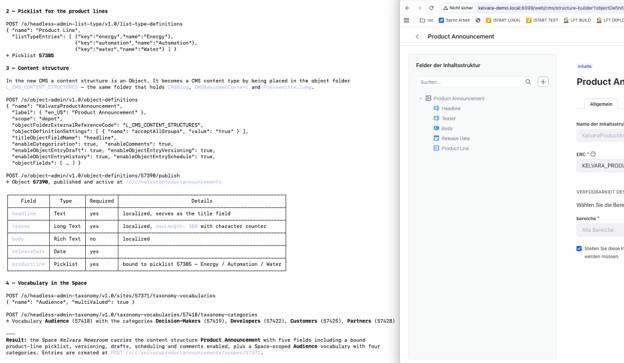

Figure 2: agent conversation showing the MCP tool calls that create an object definition, side by side with the resulting structure in Liferay CMS
-
Creating Content for Those Structures: The agent fills the structure in batches from whatever source material we provide, such as spec sheets, meeting notes, or an old product catalog. Because the definition explicitly types every field, the output lands field-accurate, and native validation catches what does not fit.
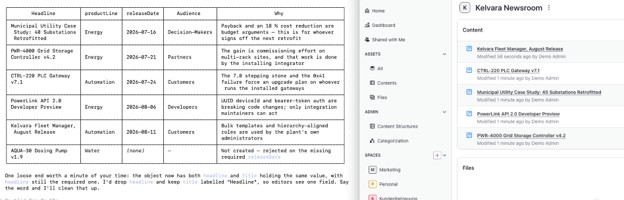

Figure 3: list of generated entries inside a Space, with populated structured fields
-
Categorizing Assets: In the same pass, the agent assigns categories from existing vocabularies. This is not string matching against labels; the model understands what the categories actually mean semantically. A category named "decision-makers" versus one named "developers" changes how the agent selects, weights, and phrases content. Your taxonomy stops being passive metadata and becomes an active instruction set the AI can act on.
How do organizations migrate classic web content to the new Liferay CMS?
Organizations migrate classic web content to the new CMS by routing both ends of the transfer through the MCP surface, turning an engineering script project into supervised agent work.
Classic web content has been in maintenance mode since 2026.Q1. The new CMS is where the platform is going — and going with it is the point of staying on Liferay. The obstacle was never conviction; it was the migration itself. Years of web content, structures, and templates do not move themselves, and the classic route with custom export-transform-import scripting is exactly the kind of project that keeps getting postponed – especially when budgets are tight.
| Feature | Legacy Scripting Projects | MCP-Enabled Agent Migration |
|---|---|---|
| Execution Speed | Slow (months/quarters) | Fast (weeks/days) |
| Logic | Static, hard-coded rules | Dynamic, semantic reasoning |
| Maintenance | High (script debugging) | Low (supervised review) |
| Scalability | Limited by code complexity | High (scales with batching) |
| Costs | Expensive (engineering heavy) | Cost-effective (task orchestration) |
This engineering bottleneck is exactly what MCP changes. Classic web content is reachable through the same MCP surface as the new CMS, on both ends of the move. An agent reads existing articles, maps them onto the new object definitions, carries the categorization over, and flags whatever does not map cleanly for a human decision. The migration becomes supervised agent work instead of a scripting project.
To be clear, this is not an "enable MCP and go" button. A migration needs a proper migration plan. Classic web content has field types and constructs with no one-to-one equivalent in Objects, nested repeatable fields, Web Contents Link Fields or logic embedded in templates have to be redesigned, not copied.
The sound approach is to define the target object definitions first, write the mapping rules including the awkward cases, let the agent execute them at scale, and review the batches. The project remains a project, but it runs an order of magnitude faster, because the effort shifts almost entirely from writing transformation code to making mapping decisions.
Can Asset Libraries be migrated into CMS Spaces using MCP?
Yes, Asset Libraries can be systematically migrated into CMS Spaces because Spaces share the exact underlying site foundations that power Asset Libraries, allowing the MCP surface to seamlessly span both entities. A migration from Asset Libraries to Spaces follows the same automation pattern: the agent transfers documents and media, keeps vocabularies and categorization intact, and consolidates what belongs together into one unified Space. If your content landscape is spread across distributed asset libraries today, this is the path that brings it into the new model without requiring a separate tooling effort.

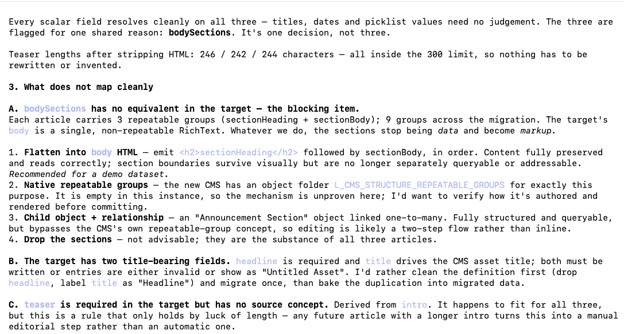
Figure 4: Migration Run: AI Agent asks for instructions during migration
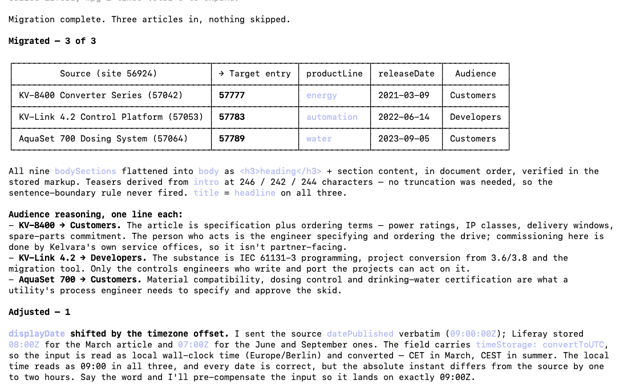

Figure 5: Agent responds back with migrated content
How do AI agents automate post-migration workflows?
Once content resides natively within the structured repository of the new CMS, the same MCP connection works in the other direction: external AI agents can query, filter, and search that content, then process what they pull for distribution channels.
Consider a concrete example from our work at Portalworks: generating a monthly newsletter. The agent queries everything published in the last month, filtering and sorting by category — producing one edition for customers on the "energy" product line and one for partners. It then does what a good editor would do with the pile: it summarizes each piece for the audience the category implies, orders items by relevance, and writes a short intro that connects them. Because the agent understands the categories semantically, the two editions read completely differently even where they draw on the same base content.
This pattern similarly covers audience-specific landing page copy, FAQ extraction from support content, and automated translation runs queued per Space. To implement these post-migration capabilities effectively, teams can leverage the systems provided in Liferay's AI Hub.

Figure 6: Newsletter draft
What are the limitations of the current DXP MCP server?
The primary limitation of the current DXP MCP server is that visual page composition remains an entirely manual process, as agents cannot yet place layout fragments onto display pages. A field report that skips the limits is not an honest one, so the gaps must be noted. While content operations — the definitions, entries, categories, and queries tools — work end to end, visual page building still requires direct human intervention
Additionally, the MCP server is still a beta capability hosted behind an explicit feature flag (LPD-63311). What the beta label undersells, however, is the rapid pace of development. The quarterly releases have moved this feature visibly each cycle – the transport switched to streamable HTTP with 2026.Q1, and tool coverage has grown steadily since.
Anyone who evaluated the MCP server six months ago is looking at a different feature today, and the trajectory points clearly toward production readiness. Even within Patch Releases, the difference is noticeable.
How has Liferay built its platform architecture to be ready for the AI era?
Liferay has prepared for the AI era by replacing its legacy content models with a single unified concept that uses a low-code/no-code framework to let agents manipulate data structures without requiring system deployments. When you step back from individual features, the macro pattern becomes clear. The native MCP server securely exposes this entire architectural layout to whatever LLM or AI tool an organization decides to deploy.
Taken together, this is Liferay shedding its legacy weight – and, unusually for a major platform shift, handing its users the exact tools to make the technical transition fast and largely automated. The migration path is not just documented; it’s programmatically streamlined.
Conveniently, the platform’s core strengths – structured data and deep headless API coverage – are precisely what the AI agent era demands. The new CMS was built from the ground up so machines can read every part of it, while the addition of the Model Context Protocol (MCP) server means those same agents can now write, too.
This is a Digital Experience Platform (DXP) taking bold, deliberate steps directly into the next phase of its category: moving past basic chat into full system operation.
Frequently Asked Questions
What is the Model Context Protocol (MCP)?
An open standard for connecting AI applications to external systems. An MCP server describes its capabilities as tools and resources; any AI assistant or AI tool acting as an MCP-capable client – such as Claude Desktop, GitHub Copilot, Cursor, Gemini CLI, or a custom agent – can discover and call them without a hand-built integration. Setting one up is typically a few lines in that client's configuration file (for Claude Desktop, its Claude Desktop configuration file) pointing at the server's endpoint. Since many organizations have already approved Copilot for internal use, the foundation to get started is already there.
What makes a CMS's MCP server implementation effective?
An effective MCP server implementation for a CMS comes down to four core pillars:
-
Structured Data Model: Delivering typed fields instead of raw HTML – so agents don't have to guess or parse messy markup to extract context.
-
Full Lifecycle Tool Coverage: Supporting creation, editing, and publishing – not just read-only access – so agents can actually execute workflows end-to-end without human handoffs.
-
Role-Based Permissions: Mirroring real user roles rather than using a blanket service account – so actions are properly audited, and security policies aren't bypassed.
-
Context-Aware Taxonomy & Metadata: Exposing semantic tags and content relationships directly to the agent – so it understands how pieces fit together and can select or generate contextually accurate content.
Can I migrate classic web content to the new CMS just by enabling MCP?
Not quite. You still need target object definitions and clear mapping rules first, because some classic field types have no direct equivalent in Objects and must be structurally redesigned. With that foundational plan in place, the agent executes the migration at scale, far faster than script-based approaches.
What about content stored in Asset Libraries?
Spaces are built on the same underlying site foundation as Asset Libraries, meaning the MCP surface reaches both cleanly. The AI agent can seamlessly migrate documents, media, and their associated categorizations from legacy Asset Libraries into CMS Spaces over the same active MCP connection.
Does the AI really understand my categories, or does it just match labels?
The agent interprets them semantically rather than relying on literal text string matching. Category names and their operational relationships directly influence how the agent selects, weights, and rewrites content, which is why a well-designed taxonomy directly improves the quality of automated outputs.
What are the current limitations?
The MCP server is a beta feature behind a feature flag. The most relevant gap in practice: fragments cannot yet be placed on pages through an agent, so visual page building remains manual. The definitions, entries, categorization, and query tools all work end to end.
How do developers connect AI tools and AI agents to the headless CMS via the MCP server?
Developers can connect AI assistants and AI agents to the headless CMS by simply updating their Claude Desktop configuration file (or the configuration of their preferred AI tools). The JSON setup requires pointing the request to the MCP server endpoint via HTTPS and providing standard authentication (such as an API key or auth token). Once granted access, the agent can query media assets, manage content structure, search metadata, and create new content type schemas or field definitions using dynamic parameters.
What makes a CMS's MCP server implementation effective?
An effective MCP server implementation for a CMS comes down to four things: a structured data model (typed fields, not raw HTML) so agents don't have to guess; full tool coverage across creating, writing, and categorizing content, not just reading it; permissions that mirror real user roles rather than a blanket service account; and semantic taxonomy handling, where categories actually change how an agent selects and phrases content. Without the first one, none of the rest matters.
By Marc Hermann
Marc Hermann is the Managing Director of Portalworks, a specialized Liferay implementation partner. With over 18 years of experience in the Liferay ecosystem, Marc focuses on digital transformation, B2B enterprise portals, and modernizing content operations through intelligent automation.


